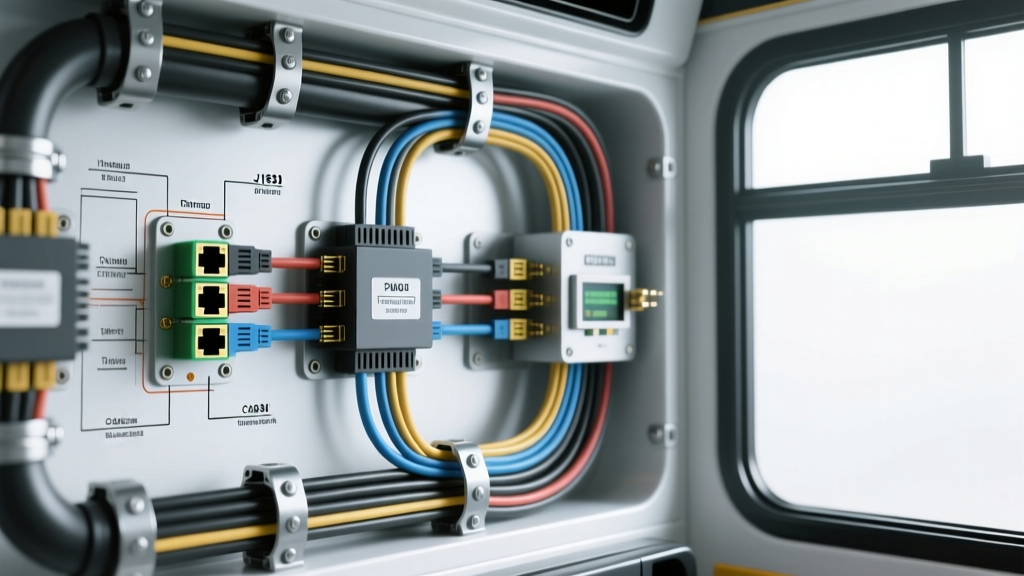
Heavy-Duty Bus Camera Installation: Beyond the 12-Volt Paradigm
Commercial transit, school, and motorcoach buses operate in extreme electrical and mechanical environments that render standard passenger vehicle wiring practices obsolete. A professional bus camera installation requires navigating 24-volt dual-battery architectures, high-amperage alternator noise, severe chassis vibration, and complex multiplexed CAN bus networks. Unlike a standard 12-volt SUV where tapping the reverse light circuit is common practice, heavy-duty Class 8 and transit vehicles utilize Pulse Width Modulation (PWM) for lighting and sophisticated J1939 data networks. Splicing directly into a bus reverse lamp circuit often results in destroyed opto-isolators, DVR reboots, and erratic video switching due to voltage spikes and PWM duty cycles. This advanced technical guide details the precise methodologies for power distribution, ruggedized data transmission, and J1939 CAN bus integration required for a fail-safe commercial camera system.
Power Architecture: 24V Systems and Voltage Drop Mitigation
Most heavy-duty transit and school buses utilize a 24-volt starting and charging system, achieved by wiring two 12-volt Group 31 or 4D batteries in series. However, the majority of commercial Mobile DVRs (MDVRs) and IP cameras operate on a 12V or 5V DC logic level. Powering these devices requires heavy-duty, galvanically isolated DC-DC step-down buck converters rated for at least 150% of the continuous draw to handle inrush currents from PoE (Power over Ethernet) switches and IR illuminators.
Furthermore, cable runs from the front-mounted MDVR to a rear-facing backup camera can easily exceed 45 feet. At these distances, voltage drop becomes a critical failure point. If a camera requires 11.5V to operate and the voltage drops below 10.5V during engine cranking or high electrical load, the camera will enter a continuous reboot loop. According to SAE J1113 Electromagnetic Compatibility standards, wiring must also be sized to handle thermal dissipation in bundled harnesses.
Voltage Drop Calculation Chart (45-Foot One-Way Run / 90-Foot Round Trip)
| Wire Gauge (AWG) | Resistance (Ohms/1000ft) | Current Draw | Voltage Drop (12V System) | Suitability for Bus Runs |
|---|---|---|---|---|
| 18 AWG | 6.385 | 1.5 Amps | 0.86V | Fail (Risk of dropout under load) |
| 14 AWG | 2.525 | 1.5 Amps | 0.34V | Marginal (Acceptable for low-draw analog) |
| 12 AWG | 1.588 | 1.5 Amps | 0.21V | Optimal (Standard for 12V PoE/Analog) |
| 10 AWG | 0.999 | 3.0 Amps | 0.27V | Required for 24V-to-12V Converter feeds |
Specification Note: Always use SAE J1128 compliant cross-linked polyethylene (XLPE) insulated wire in engine bays to withstand 125°C ambient temperatures and resist diesel fuel degradation.
Data & Video Transmission: Aviation vs. M12 PoE Connectors
Standard RCA, BNC, and RJ45 connectors are strictly prohibited in exterior bus camera installations. The high-frequency vibration of a heavy-duty chassis, combined with moisture ingress and road salt, will cause standard connectors to oxidize and fail within months. Professional installations rely on either GX-series aviation connectors for analog HD (CVI/TVI/AHD) systems or M12 X-coded connectors for Gigabit IP camera networks.
Connector Pinout Configurations
| Connector Type | Application | Pin Configuration | Environmental Rating |
|---|---|---|---|
| 4-Pin GX16 (Aviation) | Analog HD (AHD/TVI) | 1: 12V+, 2: GND, 3: Video+, 4: Audio/Mic+ | IP67 (Screw-on collar prevents vibration loosening) |
| 8-Pin M12 X-Coded | IP Cameras (GigE PoE) | Pins 1-4: Data Pairs, Pins 5-8: PoE Power | IP68/IP69K (Per TE Connectivity M12 Specs) |
When deploying IP cameras via Power over Ethernet (IEEE 802.3at), the M12 X-coded connector provides superior torsional resistance and maintains the CAT6a shielding integrity required to prevent crosstalk from the bus's high-voltage ignition harnesses.
CAN Bus Integration: J1939 Reverse Trigger Extraction
The most critical aspect of a modern bus camera installation is acquiring the reverse trigger signal without compromising the vehicle's OEM wiring warranty. Heavy-duty trucks and buses utilize the SAE J1939 protocol for inter-module communication. Instead of tapping the reverse lights, advanced installers use a J1939 CAN bus decoder module connected directly to the vehicle's 9-pin Deutsch Diagnostic Link Connector (DLC).
The decoder monitors the CAN bus for specific Parameter Group Numbers (PGNs). For reverse gear engagement, the decoder listens to PGN 61444 (Electronic Transmission Controller 1 - ETC1). Specifically, it monitors Byte 3, Bits 5 and 6. When the transmission control module (TCM) broadcasts a binary value of 01 in this specific bit window, it indicates 'Reverse Direction'. The decoder then outputs a clean, isolated 12V dry-contact trigger to the MDVR's alarm input, instantly switching the monitor to the rear-view camera.
9-Pin Deutsch DLC Splicing Specifications
| DLC Pin | Function | Wire Color (Typical OEM) | Splicing Protocol |
|---|---|---|---|
| Pin C | CAN High (J1939) | Yellow | Solder and heat-shrink; maintain twist rate |
| Pin D | CAN Low (J1939) | Green | Solder and heat-shrink; maintain twist rate |
| Pin A | Unswitched Battery (+) | Red | Use 10A inline ATC fuse for decoder power |
| Pin B | Chassis Ground | Black/White | Ring terminal to dedicated star-ground bus |
Warning: Never cut OEM CAN wires. Use military-grade T-taps or carefully strip a 3mm window in the insulation to solder a pigtail. Disrupting the 120-ohm terminating resistor circuit can cause cascading failures across the bus's ABS and transmission modules. For full network topology rules, refer to the SAE International J1939 Standard.
Grounding Protocols & EMI Shielding
Electromagnetic Interference (EMI) from 150-amp+ alternators and high-voltage glow plug circuits will induce severe noise into unshielded video feeds. To combat this, all analog video cables must be Shielded Twisted Pair (STP), and the shield must be grounded at the MDVR end only (a technique known as 'pigtail grounding' or single-point grounding) to prevent ground loops. If the shield is grounded at both the camera and the DVR, differences in chassis potential will cause alternating current to flow through the shield, resulting in a 60Hz/120Hz hum in the audio and horizontal rolling bars in the video.
Furthermore, cameras must not rely on the mounting bolts for their primary DC ground. The aluminum body panels and steel chassis rails of a bus often have dielectric paint or corrosion that creates high-resistance ground paths. A dedicated 12 AWG ground wire must be run from the camera's GX16/M12 connector directly to a centralized, star-grounded copper bus bar that is tied to the battery negative terminal via a 1/0 AWG master ground cable.
Advanced Troubleshooting Decision Tree
- Symptom: MDVR reboots when the bus starter motor engages.
Cause: Severe voltage sag on the 12V accessory bus during cranking (often dropping below 9V).
Fix: Install a supercapacitor buffer module (e.g., 10F 16V) between the DC-DC converter and the MDVR to bridge the 3-second cranking voltage dip, or upgrade the DC-DC converter to a wide-input (9V-36V) military-spec unit. - Symptom: IP camera link drops intermittently at highway speeds.
Cause: Micro-vibrations causing M12 connector pin fretting or CAT6 cable shield fatigue.
Fix: Verify M12 torque spec (typically 0.5 Nm). Replace standard PVC-jacketed Ethernet with continuous-flex, PUR-jacketed industrial Ethernet cable designed for robotic/mobile applications. - Symptom: Reverse camera fails to trigger via CAN bus, but manual MDVR switching works.
Cause: J1939 decoder is reading the wrong PGN, or the DLC CAN High/Low wires are swapped.
Fix: Use an oscilloscope to verify CAN H (Pin C) rests at ~2.5V and CAN L (Pin D) rests at ~2.5V, spiking to 3.5V and 1.5V respectively during data transmission. If inverted, swap the decoder inputs.