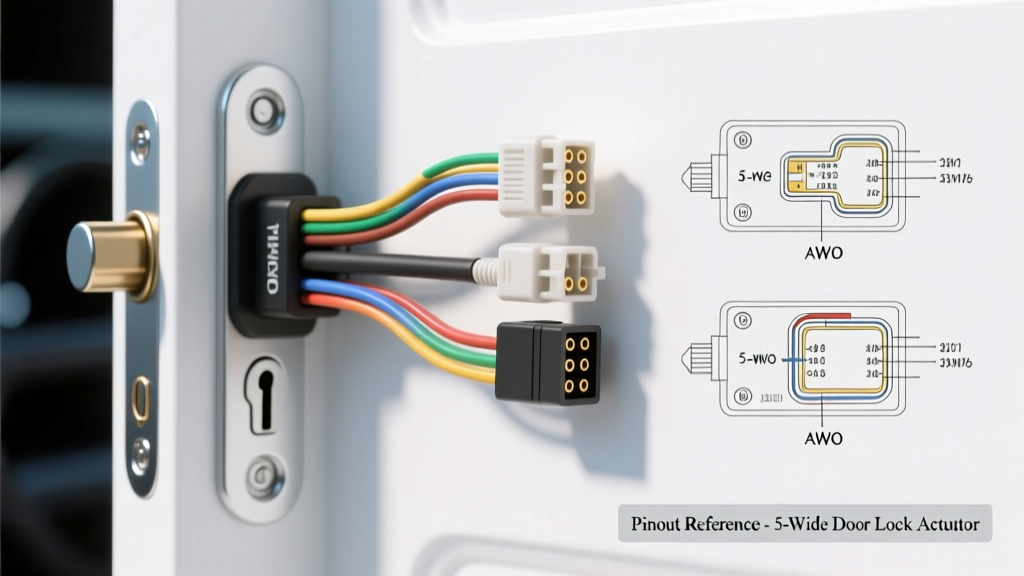
Understanding the 5-Wire Actuator Architecture
When upgrading, repairing, or integrating an aftermarket alarm into a vehicle's central locking system, referencing an accurate 5 wire door lock actuator wiring diagram is critical. Unlike standard 2-wire slave actuators that merely respond to voltage polarity changes to move a physical rod, a 5-wire master actuator serves as the command hub for the entire door lock circuit. It contains both the bidirectional DC motor and an internal microswitch assembly that provides real-time positional feedback.
The five wires are divided into two distinct circuits: the motor drive circuit (two wires) and the status feedback circuit (three wires). Understanding how to read the diagram and select the correct actuator for your specific application—whether for dome light supervision, door-ajar triggers, or alarm system integration—requires a deep dive into automotive electrical specifications, wire gauges, and relay logic.
Product Comparison: Selecting the Right 5-Wire Actuator
Not all 5-wire actuators are built to the same specifications. Choosing between a universal aftermarket kit, an OEM direct-fit replacement, or a heavy-duty security solenoid depends on your vehicle's CAN-bus architecture, physical mounting constraints, and current requirements. Below is a comparison chart to guide your selection process.
| Actuator Category | Motor Wire AWG | Microswitch Rating | Throw Distance | Best Application |
|---|---|---|---|---|
| Universal Aftermarket (e.g., PAC, Bulldog) | 18 AWG | 500mA @ 12V | 3/4 inch | Aftermarket alarm triggers, basic dome light supervision |
| OEM Direct-Fit (e.g., Motorcraft, ACDelco) | 16 AWG | 1A @ 12V | OEM Spec (Varies) | Factory harness replacements, CAN-bus feedback loops |
| Heavy-Duty Security (e.g., Lockmasters) | 14 AWG | 2A @ 12V | 1 inch | Armored vehicles, heavy commercial fleet doors, gate locks |
For most standard passenger vehicles and light trucks, the universal aftermarket 5-wire actuator is sufficient for alarm integration. However, if you are replacing a factory master actuator in a modern vehicle where the Body Control Module (BCM) monitors the lock status via a multiplexed signal, you must use an OEM direct-fit unit to match the factory resistance and microswitch timing.
The 5 Wire Door Lock Actuator Wiring Diagram Explained
To properly wire the actuator, you must separate the high-current motor circuit from the low-current signal circuit. Below is the standard industry color code and pinout configuration for universal 5-wire actuators. Always verify with a multimeter before applying power, as some regional manufacturers may deviate from these standard colors.
1. The Motor Drive Circuit (High Current)
The motor circuit requires a reversed polarity setup to dictate the lock and unlock directions. This is typically managed by a pair of Bosch-style 5-pin relays or a dedicated central locking module.
- Wire 1 (Green): Motor Input A. Connects to the relay output. When this wire receives +12V and Wire 2 is grounded, the actuator pulls the rod inward (LOCK).
- Wire 2 (Blue): Motor Input B. Connects to the relay output. When this wire receives +12V and Wire 1 is grounded, the actuator pushes the rod outward (UNLOCK).
Technical Spec: These wires should be 18 AWG. The stall current of a standard 12V lock motor is approximately 3.5 to 5 amps. Ensure your power feed is protected by a 15A or 20A fuse to handle the initial inrush current without blowing.
2. The Microswitch Feedback Circuit (Low Current)
The internal microswitch is a Single Pole Double Throw (SPDT) switch that changes state based on the physical position of the actuator rod. This circuit is strictly for signaling and should never be used to drive high-current loads directly.
- Wire 3 (White): Switch Common (C). This is the reference wire. Depending on your logic requirement, it can be tied to a +12V constant source or a clean chassis ground.
- Wire 4 (Brown): Normally Open (NO). This circuit closes with the Common wire only when the actuator is in the fully LOCKED position.
- Wire 5 (Black): Normally Closed (NC). This circuit closes with the Common wire only when the actuator is in the fully UNLOCKED position.
Technical Spec: These wires are typically 20 to 22 AWG. The microswitch contacts are usually rated for a maximum of 500mA. Exceeding this limit will cause contact arcing, welding the internal switch and destroying the feedback loop.
Application Guide: Wiring the Microswitch for Alarm & BCM Integration
The primary reason to consult a 5 wire door lock actuator wiring diagram over a 2-wire diagram is to utilize the feedback switch. Here is how to wire the switch for the two most common automotive applications, adhering to guidelines established by the the12volt.com Relay Tutorial.
Application A: Dome Light Supervision (Ground Trigger)
If you want the interior dome lights to illuminate only when the doors are unlocked via the actuator, you will use the switch to trigger a relay that grounds the dome light circuit.
- Connect the White (Common) wire to a clean chassis ground.
- Connect the Black (NC - Unlocked) wire to Terminal 85 of a standard automotive relay.
- Connect Terminal 86 of the relay to a fused +12V constant source.
- Connect Terminal 87 (Normally Open) of the relay to the vehicle's dome light ground trigger wire.
When the door unlocks, the internal switch closes the ground path, energizing the relay, and completing the ground circuit for the dome lights.
Application B: Aftermarket Alarm Lock Status (Positive Trigger)
Many high-end alarm systems require a positive (+12V) input to verify that the vehicle's doors are physically locked before arming the perimeter sensors.
- Connect the White (Common) wire to a fused +12V ignition or constant source.
- Connect the Brown (NO - Locked) wire directly to the alarm brain's 'Door Lock Status' input wire.
When the actuator pulls the lock knob down, the switch provides a +12V signal to the alarm module, confirming a secure state.
Installation Best Practices & Environmental Sealing
Door cavities are harsh environments characterized by extreme temperature fluctuations, condensation, and mechanical vibration. Proper installation techniques are mandatory to ensure the longevity of your 5-wire actuator.
- Crimping vs. Soldering: Do not solder wires inside the door jamb. Solder joints become brittle under constant vibration and flexing, leading to micro-fractures. Instead, use 18-22 AWG nylon-insulated heat shrink butt connectors. The adhesive-lined heat shrink provides a watertight seal that meets SAE J1113/12 environmental durability standards for automotive electronics.
- Wire Loom Routing: Always route the actuator wires through the factory rubber door jamb boot. If the factory boot is too tight to accommodate the 5-wire bundle, upgrade to a larger convoluted split-loom tubing and secure it with friction tape to prevent chafing against the A-pillar sheet metal.
- Moisture Protection: Apply dielectric grease to the actuator's plastic connector housing before mating it. If your actuator features flying leads instead of a plug, use liquid electrical tape on the wire exit point of the motor housing to prevent water wicking into the internal microswitch assembly.
Troubleshooting Common 5-Wire Failures
Even with a perfect diagram, real-world installations often encounter issues. Use this diagnostic tree to isolate faults in your 5-wire system.
Symptom: Motor Hums but Actuator Does Not Move
Cause: Voltage drop or mechanical binding.
Fix: Use a digital multimeter to measure voltage at the actuator's Green and Blue wires during a lock cycle. If voltage drops below 10.5V under load, your wire gauge is too thin, or your ground path is corroded. Upgrade the ground wire to 16 AWG and secure it to bare, unpainted chassis metal using a star washer.
Symptom: Alarm Triggers Randomly While Driving
Cause: Microswitch 'bounce' or rod misalignment.
Fix: If the actuator rod is not perfectly aligned with the factory lock mechanism, the physical vibration of the vehicle can cause the internal microswitch to rapidly open and close (bounce). This sends erratic signals to the BCM or alarm. Loosen the actuator mounting screws, manually lock the door, and adjust the actuator body until the microswitch clicks firmly into the locked detent before tightening.
Symptom: Dome Lights Stay On After Locking
Cause: Welded microswitch contacts or incorrect relay logic.
Fix: Disconnect the Brown and Black signal wires. Test the actuator's internal switch with a multimeter in continuity mode. If the Black (NC) wire shows continuity to White while the door is locked, the internal contacts have welded together due to driving a high-current load without a relay. The actuator must be replaced, and a Hella automotive relay must be installed to handle the dome light current.
Final Selection Summary
Mastering the 5 wire door lock actuator wiring diagram bridges the gap between basic mechanical movement and advanced vehicle security integration. By selecting the correct actuator class for your current requirements, respecting the AWG limits of the microswitch circuit, and utilizing relays for high-current feedback loops, you ensure a reliable, factory-grade central locking system capable of withstanding the rigors of the automotive environment.