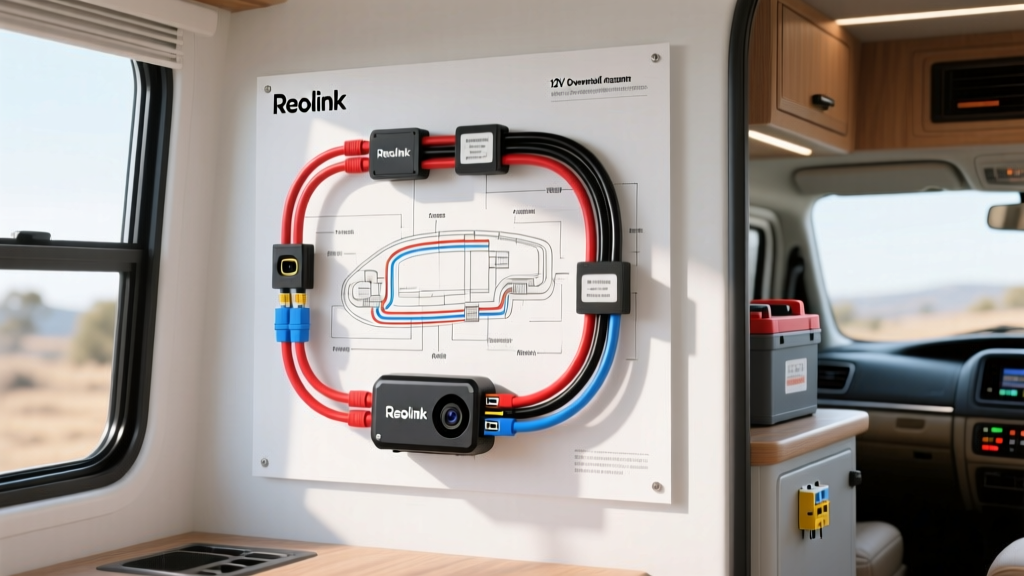
Advanced Reolink Camera Integration for Expedition Vehicles
Reolink IP cameras offer superior 4K resolution, advanced motion tracking, and seamless NVR (Network Video Recorder) integration compared to standard analog RV cameras like Furrion or Voyager. However, integrating these IT-grade network cameras into a 12V or 24V automotive overland electrical system requires bridging the gap between standard networking protocols and harsh automotive DC power environments. This advanced Reolink camera wiring diagram details the exact topology, wire gauges, isolation techniques, and failure-mode mitigations required for a reliable expedition vehicle or horse trailer build.
Core Electrical Architecture: 12V DC vs. 48V PoE
Reolink manufactures both 12V DC barrel-jack models (e.g., RLC-410, RLC-510A) and 48V Power over Ethernet (PoE) models (e.g., RLC-520A, RLC-810A). In an overland environment, running shielded Cat6 ethernet for data is mandatory to prevent electromagnetic interference (EMI) from the vehicle's alternator and ignition systems. While 12V DC models can be powered locally at the camera, utilizing a 48V PoE injector powered by the vehicle's auxiliary battery bank is the superior architectural choice. PoE provides data and power over a single shielded cable, allows the camera to be powered entirely via the NVR located inside the climate-controlled cabin, and eliminates the need for a separate DC barrel jack at the exterior mounting point.
Component Selection and AWG Sizing
Voltage drop is the primary cause of IR-cut filter failure in automotive camera installations. When a Reolink camera switches to night vision, the infrared LEDs draw an additional 1.5A to 2.5A. If the wire gauge feeding your 12V-to-48V PoE injector is insufficient, the input voltage drops below 11.2V under load. This causes the injector to brownout, resulting in a continuous camera boot loop. According to SAE J1128 standards, automotive wiring must utilize TXL (Thin-wall Cross-linked) or GXL wire to withstand high under-hood temperatures and resist chemical degradation, rather than standard THHN building wire.
| Wire Gauge (AWG) | Max Continuous Current | Voltage Drop (20 ft round trip @ 5A) | Recommended Application |
|---|---|---|---|
| 18 AWG TXL | 6 Amps | 0.64V (Drops to 11.36V) | Direct 12V Camera (Short runs under 10ft) |
| 16 AWG TXL | 10 Amps | 0.40V (Drops to 11.60V) | 12V-to-48V PoE Injector Feed (Up to 25ft) |
| 14 AWG TXL | 15 Amps | 0.25V (Drops to 11.75V) | Multi-Camera PoE Switch Feed / NVR Main Power |
Step-by-Step Reolink Camera Wiring Diagram Execution
The following execution sequence ensures clean power delivery, proper fusing, and EMI isolation for a 4-camera Reolink PoE setup powered by a 12V auxiliary lithium iron phosphate (LiFePO4) battery bank.
- Source Power & Primary Fusing: Run 10 AWG primary wire from the auxiliary battery busbar to a Blue Sea ST Blade fuse box. Install a 15A time-delay fuse. Time-delay fuses are critical here to handle the initial inrush current of the PoE switch's internal switching power supply without nuisance blowing.
- Ignition Relay Triggering: To prevent parasitic drain on your battery bank when the vehicle is parked, wire a standard ISO Mini SPDT relay (Bosch-style). Connect Pin 86 to an ignition-switched 12V source (e.g., the vehicle's upfitter switch). Connect Pin 85 to a clean chassis ground. Connect Pin 30 to the fused battery feed, and Pin 87 to the input of your isolated DC-DC converter.
- Isolated DC-DC Step-Up (PoE Injection): Automotive 12V systems experience massive voltage spikes (load dump) and alternator whine. Feed the 12V from Pin 87 into an isolated 12V-to-48V DC-DC boost converter rated for at least 120W. Isolation is mandatory; non-isolated buck/boost converters will pass alternator noise directly to the Cat6 shield, destroying your network packets.
- PoE Switch / Injector Integration: Connect the 48V output of the DC-DC converter to your ruggedized PoE switch (e.g., a Netgear GS305P or similar industrial switch) mounted in the vehicle's interior cabin. Run shielded Cat6 (S/FTP) through the vehicle's firewall using a sealed marine gland nut.
- Camera Termination: At the camera end, terminate the Cat6 with shielded RJ45 connectors. Ensure the foil shield is folded back to make contact with the metal shielding of the RJ45 plug, grounding the EMI directly to the camera chassis and ultimately to the vehicle ground via the NVR.
Cat6 Shielding and Grounding Topology
Improper grounding of shielded ethernet cable in a vehicle creates a massive ground loop antenna, picking up high-frequency noise from the ignition coils and CAN bus networks. You must employ a Star Grounding Topology. The Cat6 shield should be grounded at exactly one point—preferably at the interior PoE switch or NVR chassis. Do not ground the shield at the exterior camera mount. If the camera mounts to a metallic trailer or truck bed that has a differing ground potential than the interior cabin, a ground loop will form, resulting in severe packet loss and video stuttering. Use dielectric grease on all exterior RJ45 connections and wrap them in self-amalgamating silicone tape to maintain the IP67 weatherproof rating.
Pinout and Connector Specifications
Understanding the physical layer connections is vital for troubleshooting. Below are the critical pinouts for both the PoE data/power delivery and the 12V DC barrel jack alternative.
| Connector Type | Pin / Configuration | Function / Specification | Notes for Automotive Use |
|---|---|---|---|
| RJ45 (PoE) | Pins 1, 2, 3, 6 | 10/100/1000 Base-T Data | Must use S/FTP Cat6 for EMI rejection. |
| RJ45 (PoE) | Pins 4, 5 (V+) / 7, 8 (V-) | 48V DC PoE Power (IEEE 802.3af) | Verify polarity before connecting NVR. Reversed polarity will fry the camera's internal DC-DC board. |
| 12V DC Barrel Jack | 5.5mm OD / 2.1mm ID | 12V DC Power (Center Positive) | Center pin is +12V, outer sleeve is Ground. Use a locking aviation connector (GX12) instead of standard barrel jacks for vibration resistance. |
Troubleshooting Decision Tree: Real-World Failure Modes
When deploying Reolink cameras in overland rigs, you will encounter specific failure modes that do not exist in residential installations. Use this diagnostic tree to isolate faults.
Symptom: Camera Reboots Continuously at Night
- Cause: Voltage drop under IR load. When the IR cut filter clicks and the LEDs power on, current draw spikes.
- Fix: Measure voltage at the camera's DC input (or PoE injector input) while the camera is in night mode. If it drops below 11.5V, upgrade your feed wire from 18 AWG to 14 AWG TXL, or shorten the cable run. Ensure all crimps are done with a proper ratcheting crimp tool, as loose crimps add resistance.
Symptom: Severe Video Lag or 'Network Unstable' Warnings
- Cause: EMI interference corrupting Cat6 data packets, or IP address conflicts on the vehicle's local NAT router.
- Fix: First, verify the Cat6 shield is grounded at the NVR end. Second, check your vehicle's cellular router (e.g., Peplink or Netgear Nighthawk). If the router assigns IP addresses in the 192.168.1.x range, and the Reolink cameras default to 192.168.1.x, you will experience massive network collisions. Assign static IP addresses to all Reolink cameras via the NVR interface (e.g., 192.168.50.10 through .14) and isolate them on a dedicated VLAN if your switch supports it.
Symptom: Alternator Whine in Audio / NVR Overheating
- Cause: Ground loop passing through the PoE switch's internal power supply.
- Fix: Ensure the PoE switch is powered via an isolated DC-DC converter, not directly from the 12V bus. Furthermore, verify that the NVR chassis is grounded to the same star-ground busbar as the PoE switch to eliminate potential differences.
Authoritative References & Standards
For further reading on automotive electrical standards and networking protocols, consult the following authoritative resources:
- SAE International - J1128: Low Tension Primary Cable (Standards for automotive wire insulation and temperature ratings).
- IEEE 802.3af Standard (Specifications for Power over Ethernet data and power pinouts).
- Blue Sea Systems - Circuit Protection Guide (Best practices for marine and overland DC fusing and time-delay selection).