Why Hardwire a Ring Camera to an RV or Travel Trailer?
Most standard Ring Stick Up Camera installation guides assume a residential 110V AC environment. However, for RV, motorhome, skoolie, and overland trailer owners, integrating exterior security and backup monitoring into a 12V DC chassis or house battery system requires a completely different electrical approach. While many owners attempt to use the included solar panels, shaded forest campsites and winter angles frequently lead to depleted batteries and offline cameras. Others mistakenly wire the camera to a 110V AC inverter, which introduces massive inefficiencies; running a 400W inverter to supply a 5W camera wastes energy due to the inverter's quiescent current draw.
The ultimate solution for a reliable, continuous-power Ring Stick Up Camera installation on a vehicle is hardwiring the 12V DC house battery system through a high-efficiency DC-DC step-down buck converter. This guide details the exact wire gauges, circuit tapping methods, and weatherproofing protocols required to execute this modification safely, adhering to automotive and RV electrical standards.
Electrical Requirements & Component Sourcing
The Ring Stick Up Cam (Battery model with continuous USB power capability) requires a stable 5V DC input, typically drawing between 1A and 2A depending on whether the infrared (IR) night vision LEDs are active. Drawing 5V directly from a 12V source via a linear voltage regulator (like an LM7805) will result in severe thermal runaway and voltage sag. Instead, you must use a switched-mode DC-DC buck converter. Furthermore, all wiring must comply with SAE J1128 Low Tension Primary Cable standards to withstand the vibration, temperature fluctuations, and chemical exposures inherent to automotive and RV environments.
12V to 5V DC-DC Buck Converter Specifications
| Circuit Segment | Wire Gauge (AWG) | Max Current | Insulation / Spec |
|---|---|---|---|
| 12V Source to Buck Converter | 12 AWG Stranded | 15A | SAE J1128 GXL / Cross-linked |
| Buck Converter 5V Output | 18 AWG Stranded | 3A | UV-Resistant PVC / Silicone |
| Ground Return to Chassis/Bus | 12 AWG Stranded | 15A | SAE J1128 GXL |
| Inline Fuse (12V Side) | ATC / ATO Blade | 3A | Waterproof Inline Holder |
Step-by-Step Ring Stick Up Camera Installation on an RV
Follow these steps to integrate the camera into your RV's exterior 12V lighting or auxiliary circuit. This procedure assumes you are tapping into a WFCO or Progressive Dynamics DC distribution panel, common in most modern travel trailers and motorhomes. Always consult NFPA 1192 Recreational Vehicle Standards regarding circuit loading and overcurrent protection before modifying your RV's electrical system.
Step 1: Tapping the 12V Exterior Awning or Porch Circuit
- Disconnect Shore Power and Batteries: Turn off the main 12V DC disconnect switch and disconnect shore power to eliminate the risk of short circuits at the distribution panel.
- Locate the Target Circuit: Open your RV’s main DC distribution panel. Identify the 12V+ bus bar or the specific fuse slot for the exterior awning light or porch light. Tapping a switched circuit allows you to turn the camera off when driving or storing the RV, while tapping an unswitched auxiliary bus provides 24/7 security.
- Pull the 12 AWG Feed Wire: Route SAE J1128 compliant 12 AWG red (positive) and black (negative) wires from the distribution panel to the exterior mounting location. Use existing wire chases or conduit. Do not use household solid-core Romex; the vibration of a vehicle will cause solid copper to fatigue and snap.
- Install Overcurrent Protection: Crimp a waterproof inline ATC fuse holder onto the 12V positive wire within 6 inches of the power source. Insert a 3A blade fuse to protect the step-down converter and downstream wiring.
Step 2: Routing and Weatherproofing the Exterior Penetration
Drilling through an RV’s fiberglass, aluminum, or laminated sidewall requires careful sealing to prevent delamination and water intrusion.
- Drilling: Use a step bit to create a clean 3/8" hole through the exterior skin and interior luan backing.
- Sealing: Feed the 12V wires through the hole. Apply a generous bead of Dicor self-leveling lap sealant (for horizontal surfaces) or Dicor non-sag sealant (for vertical sidewalls) around the wire entry point. Do not rely on standard silicone, which peels off RV siding over time.
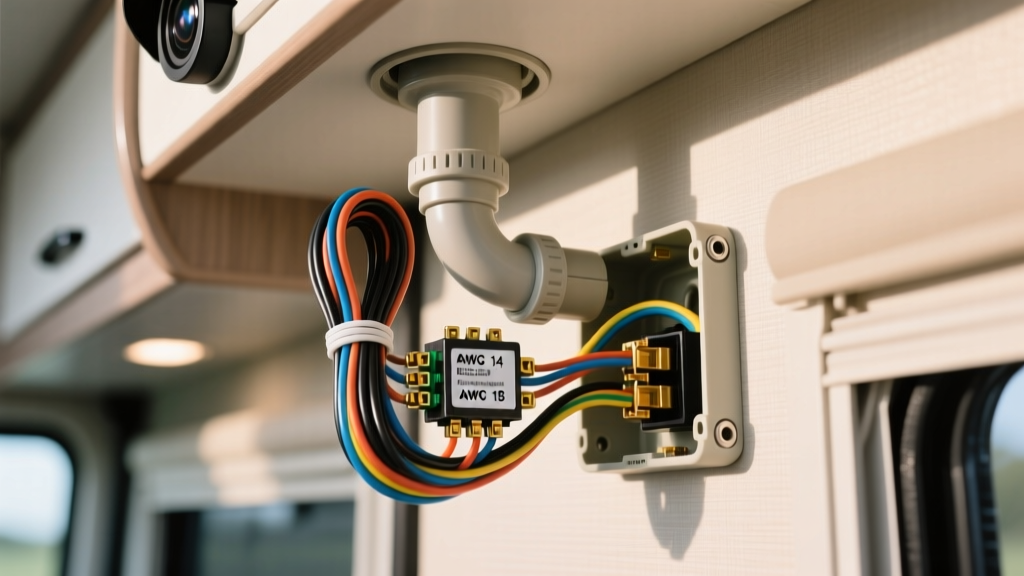
- Junction Box: Mount an IP68-rated PVC junction box over the entry hole using butyl tape and stainless steel sheet metal screws. The buck converter and all 12V-to-5V splices will live inside this weatherproof enclosure.
Step 3: Configuring the Buck Converter & Grounding
Inside the IP68 junction box, wire the sealed DC-DC buck converter. Connect the 12 AWG 12V input wires to the converter's input terminals (observe strict polarity; reversing the input will destroy the MOSFETs). On the output side, connect the 18 AWG 5V wires. Use a multimeter to verify the output is exactly 5.1V DC before connecting the camera. Solder all connections and seal them with 3M polyolefin adhesive-lined heat shrink tubing to prevent oxidation and vibration-induced disconnects.
Wiring Diagram & Pinout Reference
Visualizing the current flow is critical for diagnosing future issues. The circuit topology follows this path:
[12V DC Bus Bar] --> [3A Inline Fuse] --> [12 AWG Red Wire] --> [Buck Converter IN+] --> [Buck Converter OUT+ (5V)] --> [Micro-USB/USB-C Pigtail] --> [Ring Stick Up Cam]
[Ground Bus Bar] --> [12 AWG Black Wire] --> [Buck Converter IN-] --> [Buck Converter OUT-] --> [USB Shield/Ground] --> [Ring Stick Up Cam]
Ensure the buck converter's aluminum heatsink casing is not resting against any exposed metal inside the junction box that could cause a ground short, unless the converter is specifically designed with an isolated ground chassis.
Troubleshooting Voltage Drop & Wi-Fi Interference
When performing a Ring Stick Up Camera installation on a large motorhome or 40-foot travel trailer, wire length becomes a critical factor. The IR LEDs on the Ring camera draw peak current at night. If the voltage at the camera's USB plug drops below 4.6V, the camera will reboot endlessly or drop offline.
Symptom-Cause-Fix Decision Tree
- Symptom: Camera works during the day but goes offline at night.
Cause: Voltage drop across a long, undersized 12V wire run when IR LEDs activate (drawing ~2A at 5V, equating to ~0.85A at 12V).
Fix: Upgrade the 12V feed wire from 14 AWG to 12 AWG or 10 AWG. According to standard voltage drop formulas, a 40-foot run of 12 AWG wire carrying 1A will only drop ~0.06V, ensuring the buck converter receives a full 12.5V+ from the battery bank. - Symptom: Buck converter is hot to the touch inside the junction box.
Cause: Using a linear regulator instead of a switching buck converter, or the converter is undersized (rated for less than 3A).
Fix: Replace with a high-efficiency (95%+) switching buck converter rated for a minimum of 3A continuous output. - Symptom: Camera connects to power but fails to connect to Wi-Fi.
Cause: The RV's aluminum skin acts as a Faraday cage, and the camera is mounted too low or near the battery bank.
Fix: Mount the camera near the roofline or awning rail for better line-of-sight to your RV's exterior Wi-Fi extender or campground router.
Expert Tips for Long-Term Reliability
To finalize your installation, terminate the 5V output of the buck converter to a high-quality, UV-resistant USB-C or Micro-USB pigtail cable. Avoid cheap gas-station cables, as their internal resistance will cause a secondary voltage drop right at the camera's port. Secure the cable to the RV exterior using UV-rated cable clamps and stainless steel screws, ensuring no sharp bends exist near the camera's power port. For comprehensive support on camera power requirements and network configurations, always refer to the Ring Official Support Documentation. By utilizing automotive-grade wire, proper overcurrent protection, and a switched-mode power supply, your RV's security system will remain online and reliable, regardless of the camping environment.