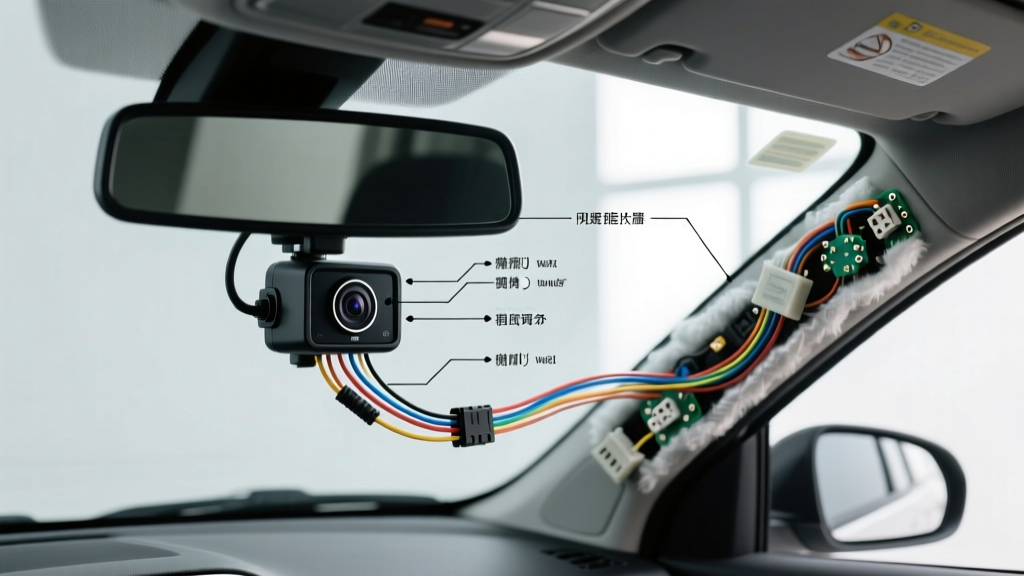
Introduction to Rear View Mirror Camera Systems
Upgrading to a rear view mirror backup camera installation provides an OEM-style aesthetic while preserving valuable dashboard real estate. Unlike traditional double-DIN head unit integrations, mirror-based displays utilize the existing windshield mount and draw power from the overhead console or ignition circuits. However, integrating the video signal, reverse trigger, and constant power requires a precise understanding of automotive electrical systems. This guide details the professional methodology for routing, tapping, and grounding your mirror camera system to ensure a flicker-free, reliable display.
Essential Tools and Materials
A professional-grade installation requires more than the basic kit provided in the box. To prevent voltage drop, corrosion, and electromagnetic interference (EMI), gather the following:
- Wire: 18 AWG GXL (Cross-linked polyethylene) primary wire for power and reverse trigger circuits.
- Connectors: Posi-Tap or Posi-Lock connectors (avoid Scotch-Loks, which pierce strands and invite moisture corrosion).
- Terminals: Heat-shrink ring terminals (16-14 AWG size for 18 AWG wire) for chassis grounds.
- Relay: Standard 12V 30A Bosch-style SPDT relay (crucial for modern PWM reverse circuits).
- Testing: Digital Multimeter (DMM) with high-impedance input and a logic probe.
- Routing: Nylon trim panel removal tools and braided wire loom to prevent harness chafing.
Standard 4-Pin Aviation Connector Pinout
Most aftermarket mirror camera systems utilize a 4-pin aviation-style screw connector at the rear of the mirror display and the camera pigtail. Understanding this pinout is critical for troubleshooting signal loss.
| Pin Number | Wire Color (Typical) | Function | Voltage / Signal |
|---|---|---|---|
| Pin 1 | Red | Camera Power (+12V) | 12V DC (Switched) |
| Pin 2 | Black | Camera Ground | 0V (Chassis Ground) |
| Pin 3 | Green or White | Reverse Trigger Input | +12V DC Signal |
| Pin 4 | Yellow | Video Signal (CVBS) | 1.0V p-p Analog |
Note: Always verify your specific manufacturer's pinout, as some 5-pin variants include a dedicated shield ground for the video line to reduce alternator whine.
Step 1: Mirror Unit Mounting and Power Integration
Most mirror displays secure to the factory mirror stalk using a heavy-duty rubber strap or a custom wedge adapter. If your factory mirror features auto-dimming or HomeLink, do not tap the factory mirror harness for the camera's main power. The auto-dim circuit often uses a pulsed ground or low-amperage LIN bus data line that cannot support the 1.5A to 2A draw of a mirror display.
Instead, route the mirror's main power harness up into the headliner and across to the A-pillar. Tap the ignition-switched (ACC) fuse in the cabin fuse box using a fused Add-A-Circuit tap. Connect the mirror's yellow (constant 12V) and red (switched 12V) wires accordingly. If your mirror lacks a constant memory wire, tie both to the ACC circuit, though you will lose saved settings like display brightness or grid-line preferences.
Step 2: Routing the AV and Power Harness
Routing the camera harness requires strict adherence to safety and EMI prevention protocols. When dropping the harness down the A-pillar, you must route the cables behind the side curtain airbag deployment zone. Secure the camera harness to the factory body wiring using zip-ties every 6 inches to prevent the cable from slipping into the airbag's explosive deployment path.
To prevent alternator whine (a high-pitched noise in the audio or visual static on the screen), keep the camera's analog video cable (usually the yellow RCA or the aviation connector) at least 4 inches away from high-current factory wiring, such as the main ECU harness or amplifier power cables. According to SAE J1113 standards regarding electromagnetic compatibility, analog video signals are highly susceptible to radiated emissions from ignition coils and fuel injectors.
Step 3: The Reverse Trigger and the PWM Problem
The most common failure point in a rear view mirror backup camera installation is the reverse trigger. The mirror requires a clean +12V DC signal on Pin 3 (Green/White) to wake the screen and switch to the camera input. In older vehicles, tapping the reverse light bulb wire provided a steady 12V. In modern vehicles (roughly 2012 and newer, especially VW, BMW, Chrysler, and Ford), the Body Control Module (BCM) uses Pulse Width Modulation (PWM) to power the tail lights.
PWM rapidly cycles the voltage on and off to monitor bulb health and reduce heat. A multimeter might read an 'average' of 7V to 10V, but the camera's trigger circuit will interpret this as a fluctuating signal, causing the mirror screen to flicker, reboot, or display a 'No Signal' message.
The PWM Rectifier Relay Solution
To solve the PWM issue, you must install a standard 12V automotive relay to isolate the camera trigger from the BCM circuit. As recommended by advanced installation guides like those at Crutchfield's technical database, wire the relay as follows:
- Terminal 86 (Coil +): Tap the vehicle's reverse light wire (the PWM source).
- Terminal 85 (Coil -): Chassis ground.
- Terminal 30 (Common): Connect to a steady 12V ignition source (via a 5A inline fuse).
- Terminal 87 (Normally Open): Connect to the mirror's Reverse Trigger wire (Pin 3).
When the BCM sends the PWM signal to the reverse lights, the relay coil energizes. The relay's internal switch then closes, sending a clean, uninterrupted 12V DC from Terminal 30 to Terminal 87, triggering the mirror display flawlessly.
Step 4: Rear Camera Power and Grounding
While many kits suggest tapping the license plate light for the camera's 12V power, this is poor practice. License plate circuits are often CANbus-monitored; adding the draw of a camera (approx. 150mA) can trigger a 'Bulb Out' warning on your dash or cause the BCM to shut down the circuit entirely.
Instead, power the camera by tapping the same reverse light circuit used to trigger your relay (or a dedicated reverse fuse in the rear cargo fuse box). For the ground, do not simply wrap bare wire around a bolt. Use an 18 AWG ring terminal, sand the chassis mounting point down to bare, shiny metal to ensure conductivity, and secure it tightly. Apply dielectric grease over the connection to prevent galvanic corrosion. A poor ground will result in a rolling video image or severe static.
Troubleshooting Common Installation Issues
Even with meticulous wiring, issues can arise. Use this decision tree to diagnose common mirror camera faults.
| Symptom | Probable Cause | Diagnostic Fix |
|---|---|---|
| Screen flickers when in reverse | PWM signal on reverse trigger wire. | Install a 12V SPDT relay or a dedicated PWM-to-DC rectifier filter module. |
| Horizontal rolling lines on video | Ground loop or poor camera ground. | Verify camera ground is on bare metal. Ensure mirror ground and camera ground share the same reference plane. |
| Mirror stays on after car is off | Constant 12V and ACC 12V swapped at the headliner. | Use DMM to verify which mirror power wire loses voltage when the key is removed; re-pin or swap Posi-Taps. |
| 'No Signal' but trigger works | Damaged AV pin or EMI interference. | Check Pin 4 on aviation connector for bent pins. Reroute video cable away from factory high-current harnesses. |
Final Verification and Calibration
Once all connections are made, wrap all Posi-Taps and solder joints in high-quality adhesive-lined heat shrink. Reassemble the A-pillar trim and headliner. Before finalizing the camera mounting bracket on the license plate or rear bumper, turn the vehicle to the 'ON' position (engine off to reduce alternator noise) and engage the reverse gear. Have an assistant stand behind the vehicle while you adjust the camera's vertical and horizontal angle via the display's settings menu. Ensure the reference grid lines align with the ground approximately 10 feet behind the rear bumper, providing optimal spatial awareness for parking and trailer hitching. For further reading on safe automotive electrical modifications, refer to the Haynes technical tutorials on aftermarket accessory wiring.