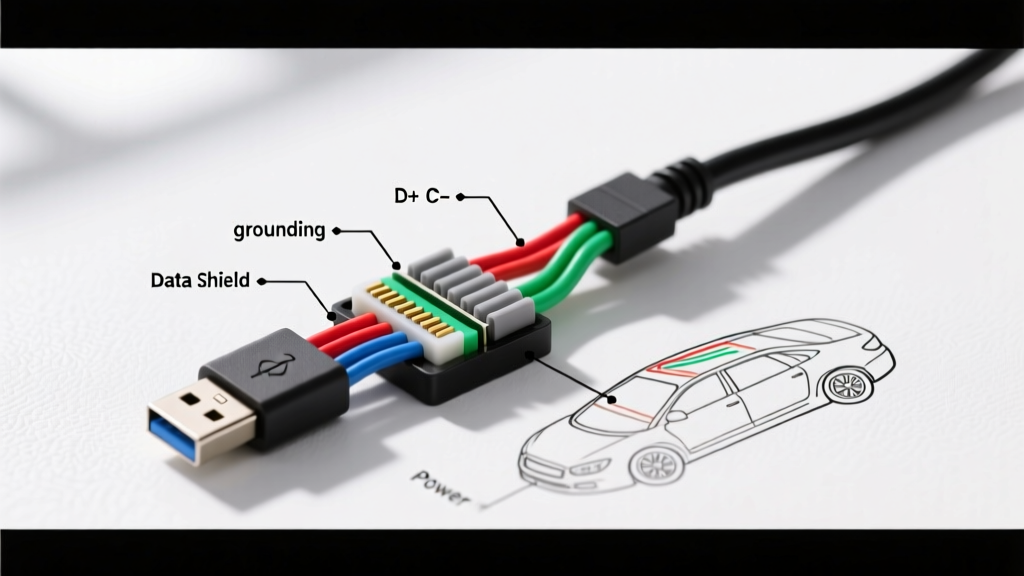
The Standard USB Pinout vs. The "No Black Wire" Anomaly
When integrating aftermarket infotainment systems, CarPlay/Android Auto data hubs, or dashcam hardwire kits, technicians frequently encounter a puzzling scenario: a proprietary or aftermarket USB pigtail that lacks the standard black ground wire. If you are searching for a wiring diagram USB cable no black wire configuration, you are likely dealing with a shield-grounded data cable, a power-only step-down module, or an OEM-specific chassis-grounded connector. In automotive electrical environments, omitting the dedicated black ground wire is not a manufacturing defect; it is a deliberate design choice to mitigate Electromagnetic Interference (EMI) and Radio Frequency Interference (RFI) generated by the vehicle's alternator, ignition system, and CAN bus networks.
According to the USB Implementers Forum (USB-IF) USB 2.0 Specification, a standard Type-A to Type-B or Micro-USB cable contains four conductors: Red (VBUS +5V), White (Data-), Green (Data+), and Black (GND). However, automotive-grade USB harnesses often replace the insulated black ground wire with an uninsulated braided copper shield and a bare drain wire. This walkthrough will dissect the anatomy of these cables, provide exact pinout translations, and detail the step-by-step protocol for properly terminating a USB cable without a black wire in a 12V vehicle environment.
Complete Wiring Diagram Walkthrough: Identifying Your Cable
Before splicing into any vehicle accessory circuit or infotainment harness, you must identify which variant of the "no black wire" USB cable you are holding. Stripping back 1.5 inches of the outer PVC or TPE jacket will reveal one of three internal architectures.
Variant A: The Shield-Grounded Data Hub (Most Common)
Used primarily for high-speed data transfer (CarPlay, Android Auto, OBD-II data loggers). Inside the jacket, you will find Red (24 AWG), White (28 AWG twisted pair), Green (28 AWG twisted pair), and a bare copper braided shield wrapping an aluminum foil layer. The bare copper strand running alongside the foil is the drain wire. In this wiring diagram, the drain wire and braided shield completely replace the black ground wire, serving as both the 0V reference and an EMI Faraday cage.
Variant B: Proprietary OEM Chassis-Ground Pigtails
Found in GM, Ford, and Honda factory infotainment extensions. The cable may only contain three insulated wires (Red, White, Green). The ground path is established through the metal shell of the USB Type-A or Type-C connector, which mates directly to a grounded metal bracket on the dashboard or center console. Molex automotive connector documentation frequently references this chassis-grounding technique to save weight and reduce pin count in high-density infotainment harnesses.
Variant C: Power-Only Step-Down Modules
Common in dashcam hardwire kits and aftermarket 12V-to-5V USB chargers. These cables contain only a Red (5V output) wire and a bare shield/drain wire, entirely omitting data lines and the black wire. The shield acts as the negative return path to the chassis.
Pinout & Specification Reference Chart
| Standard Pin | Standard Color | Auto "No Black" Variant | AWG Size | Function & Automotive Notes |
|---|---|---|---|---|
| Pin 1 (VBUS) | Red | Red (Insulated) | 20-24 AWG | +5V DC Power. Must handle up to 1.5A for charging hubs. Use a 2A inline fuse. |
| Pin 2 (D-) | White | White (Twisted Pair) | 28 AWG | Data Negative. Highly susceptible to alternator whine if shield is compromised. |
| Pin 3 (D+) | Green | Green (Twisted Pair) | 28 AWG | Data Positive. Must maintain 90-ohm differential impedance. |
| Pin 4 (GND) | Black | MISSING (Replaced by Shield/Drain) | N/A (Shield) | 0V Reference / Chassis Ground. Must be terminated to bare metal, max 0.1 ohm resistance. |
Step-by-Step Integration & Shield Grounding Protocol
Terminating a USB cable with no black wire requires precision. The 28 AWG data wires are fragile, and the braided shield must be consolidated without creating a short circuit against the data lines. Follow this protocol to ensure compliance with SAE J1113 Electromagnetic Compatibility standards, which dictate strict limits on conducted and radiated emissions in vehicle networks.
- Strip and Stage: Carefully strip 1.5 inches of the outer jacket using a precision wire stripper. Do not nick the underlying aluminum foil or the braided copper shield.
- Extract the Drain Wire: Locate the bare, uninsulated copper drain wire resting against the foil. Pull it back and separate it from the insulated Red, White, and Green wires.
- Consolidate the Shield: If the cable has a braided shield in addition to the drain wire, twist the braided strands tightly together with the drain wire to form a single, unified "ground" conductor. Apply a small amount of rosin-core flux and tin the twisted shield with a soldering iron set to 350°C (660°F).
- Terminate the Data/Power Lines: Strip 5mm of insulation from the Red, White, and Green wires. Crimp using automotive-grade micro-pins (e.g., TE Connectivity or Molex MX150 series) or solder directly to your pigtail harness using 22-26 AWG heat shrink butt splices.
- Ground the Shield (The Critical Step): Since there is no black wire to route to a standard ground bus, the tinned shield/drain wire must be terminated to the vehicle chassis. Crimp a 10-12 AWG ring terminal to the drain wire using a step-down crimp sleeve filled with dielectric grease. Attach this ring terminal to an unpainted, factory-grounded metal point on the dashboard frame.
- Torque and Protect: Secure the ground ring terminal with an M6 bolt, torqued to 9-10 Nm. Wrap the entire exposed USB splice in friction tape (Tesa tape) to prevent squeaks and rattles, followed by split-loom corrugated tubing for abrasion resistance.
Troubleshooting Voltage Sag and Data Dropouts
When a wiring diagram for a USB cable with no black wire is misinterpreted, the most common failure modes involve data dropouts (CarPlay disconnecting over bumps) or severe voltage sag (devices refusing to charge). Use the following decision tree to diagnose issues related to missing or improperly grounded shield wires.
Symptom 1: Alternator Whine in Audio / Data Disconnects Under Load
- Cause: The braided shield/drain wire was left floating (unconnected) or was wrapped in electrical tape instead of being bonded to the chassis. The shield is acting as an antenna, absorbing high-frequency noise from the alternator's rectifier diodes and injecting it into the D+/D- data lines.
- Fix: Locate the drain wire. Use a digital multimeter (DMM) to verify continuity between the drain wire and the metal shell of the USB Type-A connector. Bond the drain wire to a verified chassis ground. Verify the ground point has less than 0.1 ohm of resistance to the negative battery terminal.
Symptom 2: 5V Voltage Sag (Reading 4.2V or Lower at the Connector)
- Cause: The shield/drain wire is too thin or has high resistance at the crimp joint, causing a voltage drop on the return path. Alternatively, the Red (VBUS) wire is spliced into a high-resistance accessory circuit rather than a dedicated 12V ignition source.
- Fix: Perform a voltage drop test across the ground return path. Place the red probe of your DMM on the metal shell of the USB connector and the black probe on the battery negative. With a load applied (e.g., a phone charging), the voltage drop should not exceed 0.1V. If it does, replace the shield-to-chassis crimp with a heavier gauge jumper wire soldered directly to the shield braid.
Symptom 3: Device Charges but No Data Connection (CarPlay Fails)
- Cause: The shield was improperly stripped, and a stray strand of the braided copper shield is shorting against the White (D-) or Green (D+) wire. Because the shield is grounded to the chassis, this shorts the data line directly to ground, killing the differential signal.
- Fix: Cut back the splice. Apply 15mm of Kapton tape or thin heat shrink over the twisted data pair before folding the braided shield back over them. Ensure absolute physical isolation between the 28 AWG data cores and the shield ground.
Final Technical Considerations for Automotive USB Integration
Working with a wiring diagram for a USB cable with no black wire demands a shift in perspective: you must treat the cable's physical geometry and shielding materials as active electrical components, not just passive insulation. Always verify that your 12V-to-5V step-down power source is rated for at least 2.4A continuous output to prevent thermal shutdown during high-draw navigation and charging scenarios. By correctly identifying the drain wire, consolidating the braided shield, and establishing a low-impedance path to the vehicle chassis, you ensure rock-solid data integrity and reliable power delivery in the harsh electrical environment of a modern vehicle.