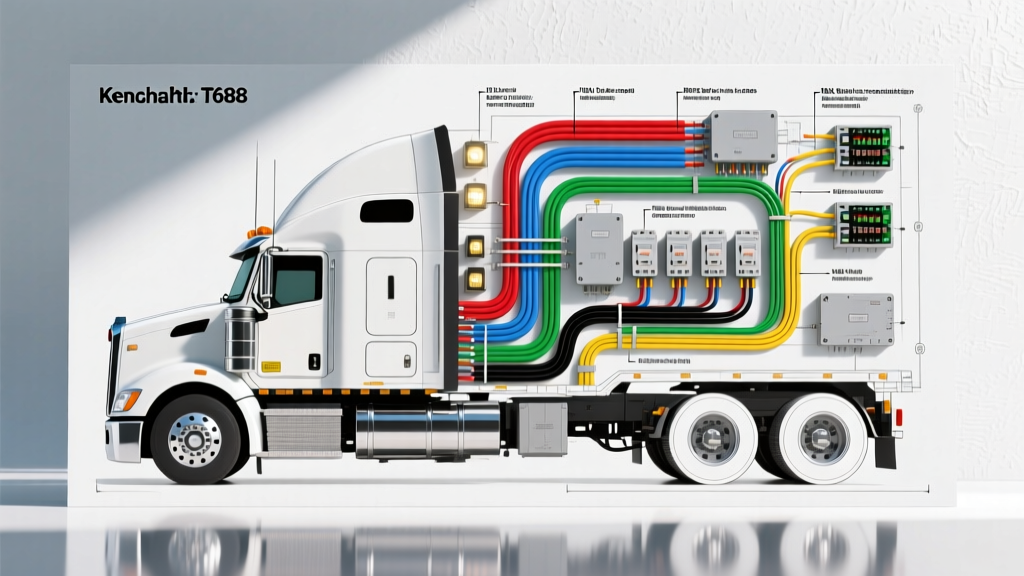
Understanding the T680 Multiplexed Electrical Architecture
When tackling heavy-duty truck modifications, accessing a comprehensive Kenworth T680 wiring diagram PDF is the critical first step. Unlike light-duty pickups, the T680 relies on a sophisticated multiplexed (MUX) electrical architecture. This means that physical copper wires are replaced by digital data networks—specifically the J1939 CAN bus and proprietary Paccar MUX nodes—that communicate logic commands to solid-state drivers. Whether you are installing auxiliary LED light bars, integrating a hydraulic PTO (Power Take-Off) solenoid, or adding aftermarket telemetry, treating the T680 like a conventional 12V analog system will result in blown fuses, MUX node faults, and parasitic battery drains. This guide decodes the T680 wiring schematic for upfitters and owner-operators, providing actionable pinouts, AWG specifications, and integration protocols.
The Kenworth T680 utilizes a distributed MUX system comprising a Cab Node, Chassis Node, and Dash Node. When you consult the official Kenworth T680 technical resources, you will notice that switches on the dash do not carry the primary load current. Instead, a dash switch sends a low-current MUX signal to the Cab Node. The Cab Node processes this logic and triggers a solid-state output driver located in the chassis relay center.
For modification projects, this architecture dictates that you cannot simply tap into a dash switch wire to power a high-draw accessory. Doing so will overload the MUX input circuit, triggering a diagnostic trouble code (DTC) and disabling the entire switch bank. Instead, modifications must be integrated at the Chassis Node output drivers or via the dedicated upfitter interface.
Project 1: Auxiliary Lighting & Upfitter Switch Integration
Adding off-road or auxiliary work lights is a common T680 upgrade. The T680 typically features up to six auxiliary upfitter switches on the overhead console.
Locating the Upfitter Output Drivers
The physical outputs for the upfitter switches are located in the Chassis Node relay box, typically mounted behind the battery box or on the driver-side frame rail. According to the OEM wiring diagram PDF, these outputs provide a switched 12V ground or 12V positive feed, depending on the specific model year and configuration.
Most T680 upfitter outputs are rated for 15A to 20A continuous. However, because they are solid-state transistor drivers, they are highly sensitive to inrush current. LED light bars often draw a massive inrush spike upon startup. To protect the MUX node, you must use the OEM upfitter output to trigger the coil of a heavy-duty mechanical relay (e.g., a 40A Bosch-style or Hella solid-state relay), rather than powering the lights directly.
Wire Gauge and Routing Specifications
When running new harnesses from the chassis relay center to the cab roof or bumper, adhere to heavy-duty wiring standards.
- Control Circuit (MUX to Relay Coil): 14 AWG TXL (Cross-linked polyethylene) wire. TXL is mandatory for its high-temperature resistance and thin insulation, making it ideal for routing through the T680's tight bulkhead grommets.
- Primary Power Feed (Battery to Relay): 10 AWG or 8 AWG stranded copper, fused within 18 inches of the battery positive terminal.
- Load Circuit (Relay to Aux Lights): 12 AWG to 14 AWG, depending on the total amperage draw and the length of the run to account for voltage drop.
Project 2: PTO Solenoid and J1939 CAN Bus Integration
If your T680 is equipped with a Paccar MX-13 or MX-11 engine and you are adding a hydraulic PTO for a dump bed, crane, or compressor, the PTO solenoid must be synchronized with the engine ECM (Electronic Control Module). The ECM needs to know the PTO is engaged to adjust the idle governor and prevent engine stall.
Tapping the J1939 Data Link
The PTO request is communicated via the SAE J1939 CAN bus network. The SAE J1939 standard dictates a twisted-pair data link operating at 250 kbps.
- CAN High (CAN-H): Yellow wire
- CAN Low (CAN-L): Green wire
CRITICAL WARNING: Never strip and splice directly into the OEM J1939 twisted pair. Breaking the twist introduces electromagnetic interference (EMI), which can corrupt data packets, causing the Paccar ECM to derate the engine or shut down the PTO mid-cycle.
Instead, locate the 120-pin OEM bulkhead connector or the diagnostic 9-pin Deutsch connector behind the driver's kick panel. Use a proper Deutsch DT 4-way Y-harness to break out the CAN-H and CAN-L lines. Furthermore, the J1939 backbone requires exactly two 120-ohm terminating resistors—one at each end of the network. If your aftermarket PTO controller or telematics device does not have an internal switchable resistor, ensure you are not inadvertently adding a third resistor to the bus, which will drop the network impedance to ~40 ohms and cause total network failure.
T680 Modification Pinout & Specification Reference
| System / Circuit | Wire Color Code (Typical) | AWG Size | Connector / Pin Type | Max Continuous Load |
|---|---|---|---|---|
| Upfitter Switch 1 (MUX Output) | Brown w/ White Tracer | 14 AWG | Deutsch DT / Metri-Pack | 15A (Resistive) |
| PTO Solenoid Ground Control | Black w/ Yellow Tracer | 12 AWG | AMP Superseal 1.5 | 20A |
| J1939 CAN-H (Data Link) | Yellow | 18 AWG (Twisted) | Deutsch 9-Pin Diag | N/A (Data) |
| J1939 CAN-L (Data Link) | Green | 18 AWG (Twisted) | Deutsch 9-Pin Diag | N/A (Data) |
| Cab Node Main Power Feed | Red (Heavy Duty) | 4 AWG | Ring Terminal / Stud | 60A |
Common Modification Failure Modes & Troubleshooting
When modifying the T680 electrical system, technicians frequently encounter issues related to the MUX node's self-diagnostic routines.
1. Open Circuit or Short to Ground DTCs on Aux Lights
The Cause: Solid-state MUX outputs perform a continuity check before and during operation. Modern LED work lights draw very little current (often under 2A). If the current draw falls below the Cab Node's minimum threshold (typically around 1.5A to 3A, depending on the software flash), the node assumes the bulb is blown or the wire is severed. It will then shut off the circuit and log an Open Circuit DTC.
The Fix: Wire a 10-ohm, 50W power resistor in parallel with the LED light to simulate the draw of a halogen bulb, or use a mechanical relay as an intermediary so the MUX node only sees the 150mA draw of the relay coil (if programmed for low-current logic outputs) or use a PTC load resistor designed specifically for heavy-truck MUX systems.
2. Parasitic Draw and MUX Sleep Mode Failure
The Cause: The T680 Cab and Chassis nodes require a specific sequence to enter sleep mode and shut down the CAN bus to prevent battery drain. If an aftermarket accessory (like a dash cam or GPS tracker) is wired to a switched 12V source that stays hot during the MUX shutdown sequence, or if a diode is installed backward allowing reverse leakage current, the nodes will stay awake. This will drain the AGM battery bank in 48 hours.
The Fix: Always use a relay triggered by the ignition sense circuit, or tap into a dedicated accessory delay output provided in the upfitter manual. Verify sleep mode by using a digital multimeter (DMM) to monitor the J1939 CAN-H line; it should drop from ~2.5V to 0V within 15 minutes of turning the key off and opening/closing the door.
Bulkhead Connector Pin Extraction & Crimping
When adding circuits through the T680's 120-pin firewall bulkhead connector, never use a standard pick tool to release the pins. The OEM connector utilizes a secondary locking wedge (TPA - Terminal Position Assurance). You must first pop the TPA wedge using a specialized plastic wedge tool, then use a Deutsch/Paccar-specific pin extraction tool to depress the micro-tangs. For crimping, a pneumatic or ratcheting Deutsch DT crimper is mandatory. Hand-crimping 14 AWG or 12 AWG solid-core pins often results in a cold crimp, leading to voltage drop and localized melting under high-vibration conditions typical of Class 8 highway operation. Always use dual-wall heat shrink tubing with an adhesive lining over the crimp barrel to prevent moisture wicking into the copper strands via capillary action.
Final Upfitter Best Practices
Always cross-reference your specific model year's Kenworth T680 wiring diagram PDF with the Paccar Body Builder Manual. Wire color codes and pin assignments can change mid-production run based on the chassis node supplier (e.g., Vansco vs. Diamond Logic). Use only sealed connectors (IP67 or IP69K rated), apply dielectric grease to all Deutsch and AMP connections, and secure harnesses with UV-resistant nylon cable ties away from the DEF (Diesel Exhaust Fluid) lines and hot EGR components. Proper integration ensures your T680 remains reliable, whether you're idling on a job site or cruising at highway speeds.