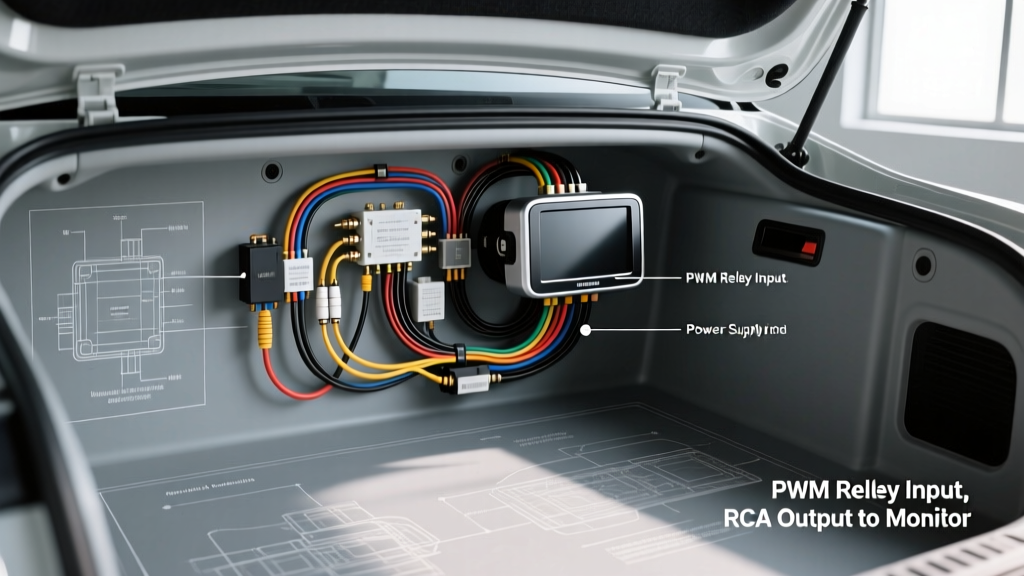
Pre-Installation Electrical Load and Wire Sizing
A successful aftermarket reversing camera installation hinges on delivering stable, clean direct current (DC) to both the camera module and the head unit trigger circuit. Most universal CMOS and CCD backup cameras draw between 120mA and 250mA at 12V DC. While this low amperage theoretically allows for 22 AWG wire, automotive environments demand strict adherence to SAE J1128 standards for low-tension primary cables. We strictly mandate 18 AWG stranded, cross-linked polyethylene (XLPE) insulated copper wire for all power and trigger extensions. This gauge provides the necessary tensile strength to survive chassis flex and vibration without suffering from micro-fractures that lead to intermittent signal loss or voltage drop.
Furthermore, according to IPC-A-620 standards for electronic assemblies, piercing T-tap connectors (often sold in cheap installation kits) are classified as unacceptable for automotive primary wiring due to moisture ingress and copper strand severing. All splices in your reversing camera installation must be executed using a Western Union mechanical splice, soldered with rosin-core 60/40 solder, and sealed with dual-wall adhesive-lined heat shrink tubing featuring a minimum 3:1 shrink ratio.
Step 1: Tail Light Trigger Identification and the PWM Problem
The most common failure point in a reversing camera installation is tapping directly into the reverse light circuit to power the camera and trigger the head unit. In vehicles manufactured prior to 2010, this was a simple 12V DC circuit. However, modern vehicles (particularly VW, BMW, Chrysler, and Ford models post-2012) utilize multiplexed networks and Pulse Width Modulation (PWM) to power tail lamps. This reduces wiring harness weight and allows the BCM (Body Control Module) to monitor bulb resistance for outage detection.
Identifying a PWM Reverse Circuit
If you probe a modern reverse light wire with a standard digital multimeter, you may read an average of 7V to 9V DC. However, an oscilloscope will reveal a 12V square wave pulsing at 400Hz to 1kHz. If you tap this PWM signal directly:
- The camera's internal voltage regulator will overheat and fail prematurely due to the high-frequency switching.
- The video feed will flicker violently or display horizontal rolling bars.
- The aftermarket head unit may fail to recognize the trigger signal, as it requires a steady minimum of +6V DC to switch the display input.
Step 2: Wiring the ISO Mini Relay for Clean 12V Power
To bypass the BCM's PWM signal and generate a clean, solid 12V DC source for your reversing camera installation, you must integrate a standard 30A ISO mini automotive relay (referencing Littelfuse automotive relay specifications). This isolates the sensitive camera electronics from the vehicle's data bus.
Relay Pinout and Wiring Diagram
- Pin 86 (Coil +): Connect to the vehicle's PWM reverse light wire. The low amperage of the PWM signal is sufficient to energize the relay coil without throwing a BCM bulb-outage code.
- Pin 85 (Coil Ground): Connect to a clean, bare metal chassis ground. Sand away the paint, secure with a ring terminal, and coat with zinc-rich primer to prevent galvanic corrosion.
- Pin 30 (Common Input): Connect to a fused 12V ignition-switched source. Use an Add-A-Circuit fuse tap in the interior fuse box, ensuring you tap a circuit that powers down with the key (e.g., radio or wiper circuit) to prevent parasitic battery drain.
- Pin 87 (Normally Open Output): This is your clean 12V DC output. Splice this wire to both the camera's 12V power pigtail and the long reverse trigger wire running to the head unit.
Step 3: RCA Video Cable Routing and Shield Grounding
The RCA composite video cable carries a low-voltage (typically 1V peak-to-peak) analog signal with a 75-ohm impedance. It is highly susceptible to Electromagnetic Interference (EMI) and Radio Frequency Interference (RFI). Improper routing during your reversing camera installation will result in alternator whine, ignition spark noise, or complete signal dropout.
Routing Best Practices
Always route the RCA video cable down the opposite side of the vehicle's main body wiring harness. Never zip-tie the RCA cable alongside high-current feeds, such as the fuel pump power wire, ABS module harness, or aftermarket amplifier power cables. If crossing a high-current wire harness is physically unavoidable, do so at a strict 90-degree angle to minimize inductive coupling. Ensure the RCA barrel connectors are wrapped in Tesa cloth tape to prevent them from vibrating against the sheet metal and creating micro-shorts in the shield grounding.
Step 4: Head Unit Integration and EIA-770-D Pinouts
To force the aftermarket head unit to switch from the radio or navigation screen to the reverse camera feed, the reverse trigger wire must receive a positive 12V DC signal when the vehicle is shifted into reverse. Standard EIA-770-D color coding dictates that this wire is almost universally Purple/White or solid Purple across major manufacturers.
| Head Unit Brand | Reverse Trigger Wire Color | Voltage Threshold | Polarity Protection |
|---|---|---|---|
| Pioneer (NEX Series) | Purple/White | +6V to +12V DC | Internal Diode |
| Kenwood (eXcelon) | Purple/White | +8V to +14V DC | Internal Diode |
| Alpine (iLX Series) | Purple/White | +6V to +12V DC | Internal Diode |
| Sony (XAV Series) | Purple/White | +6V to +12V DC | Internal Diode |
Connect the output from Pin 87 of your relay directly to this Purple/White wire behind the head unit chassis. Do not use the head unit's "Reverse Ground" wire (if equipped) for this connection, as that is intended for OEM CAN-bus integrations, not 12V positive triggers.
Troubleshooting Real-World Failure Modes
Even with meticulous planning, automotive electrical systems are noisy environments. Use this decision tree to diagnose common reversing camera installation failures.
Symptom: Alternator Whine or Buzzing in the Video Feed
Cause: A ground loop. The camera's ground reference and the head unit's ground reference are at different electrical potentials, causing current to flow through the RCA cable's outer shield.
Fix: First, verify that both the camera and the head unit share a common, clean chassis ground point. If the noise persists, install an inline RCA ground loop isolator near the head unit. Note that cheap isolators can degrade high-frequency video data, resulting in a blurry image; use a high-bandwidth toroidal isolator.
Symptom: Camera Image Flickers Only When the Engine is Running
Cause: The vehicle's alternator is introducing AC ripple voltage into the 12V DC power line feeding the camera.
Fix: Solder a 1000µF 25V electrolytic capacitor across the camera's 12V positive and ground wires directly at the camera pigtail. Ensure the capacitor's negative stripe (ground) faces the chassis ground. This acts as a low-pass filter, smoothing out the AC ripple and providing a steady DC voltage to the camera's image sensor.
Symptom: Head Unit Does Not Switch to Camera View
Cause: Insufficient voltage reaching the head unit's trigger wire, or an improperly installed fuse tap.
Fix: Use a multimeter to probe the Purple/White wire at the head unit harness while the vehicle is in reverse (engine running). You must see at least +8V DC. If you read 0V, check the Add-A-Circuit fuse tap in the fuse box. A common error is inserting the fuse tap backward; the metal prong must feed both the original circuit and the tapped circuit simultaneously. Rotate the tap 180 degrees if necessary and re-test.